
How to Follow Up With Facebook and Instagram Lead Ads Automatically
Sending a Meta lead to a CRM is only the first step. Learn how to turn every form submission into a timely, useful conversation that qualifies the prospect, follows up appropriately, and books the next step.
A person submits your Facebook or Instagram lead form. Meta records the lead. Your CRM receives the contact. Then the process quietly breaks.
The lead waits. A salesperson is busy. An email notification gets buried. By the time someone calls, the prospect has forgotten the ad or already contacted another provider.
The fix is not merely sending Facebook leads to a spreadsheet or CRM. A complete Meta Lead Ads follow-up system should detect the submission, respond on an approved channel, continue the conversation, qualify the prospect, follow up when appropriate, and either book the next step or bring in a human.
This guide shows how to build that workflow for a service business without turning every lead into a generic autoresponder sequence.
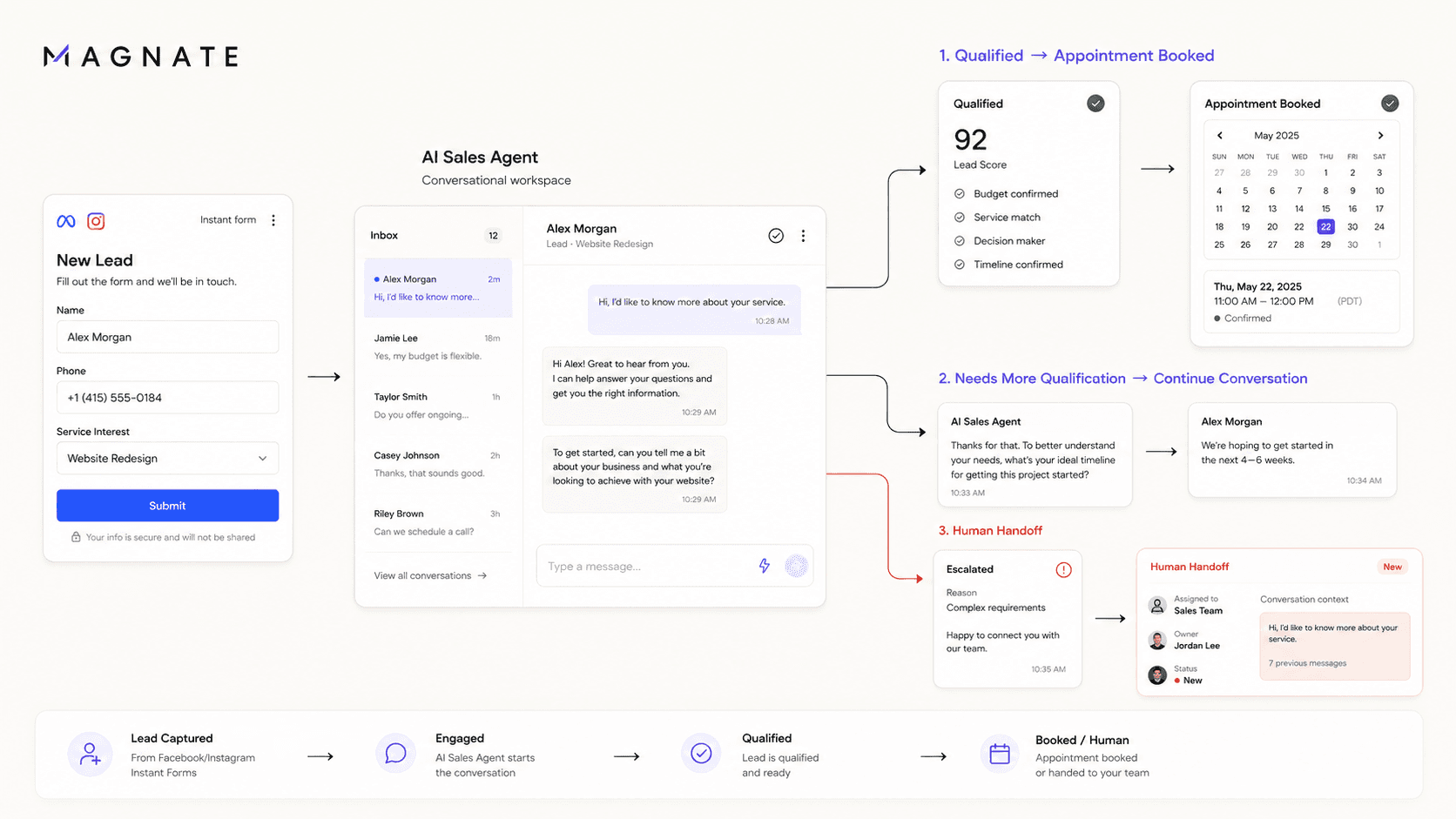
What is Facebook Lead Ads follow-up automation?
Facebook Lead Ads follow-up automation is a workflow that starts when someone submits a Facebook or Instagram Instant Form. It transfers the lead data into a lead-management system and triggers the next appropriate action, such as a personalized message, qualification questions, an appointment offer, or a notification to a salesperson.
The important distinction is this:
Lead delivery moves data. Lead follow-up moves the conversation forward.
Meta itself recommends using an integrated CRM system or Leads Center to collect lead data and minimize response delays. It also advises businesses to set clear expectations and continue the conversation after form submission. In other words, connecting the form is the foundation, not the finished process.
Why Facebook and Instagram leads become unresponsive
Meta Instant Forms are designed to reduce friction. A prospect can submit information without completing a long website journey. That convenience can generate demand, but it also creates a short gap between mild interest and active buying intent.
Leads commonly go cold for five reasons:
- The response arrives too late. Interest is strongest around the moment of submission and can fade quickly.
- The first message says nothing useful. “Thanks, we will contact you soon” confirms receipt but gives the person no reason to reply.
- The prospect has to repeat everything. Asking for information already present in the form creates unnecessary friction.
- The follow-up is either absent or excessive. One missed call is not a process; ten identical messages are not one either.
- No one owns the next step. The lead exists in a CRM, but there is no clear rule for qualification, booking, assignment, or human takeover.
An often-cited Harvard Business Review article, The Short Life of Online Sales Leads, reported that many businesses were not responding to online inquiries quickly enough. That research was published in 2011 and should not be treated as a universal conversion guarantee. The useful principle still holds: when a person has just requested information, delaying the response introduces avoidable risk.
If you want a deeper explanation of response timing, read why speed to lead matters for service businesses.
The complete Meta Lead Ads follow-up workflow
A reliable workflow has seven stages.
1. Capture the lead immediately
Connect the Facebook Page and Instant Form to your CRM, lead-management platform, or sales agent. Magnate users can follow the Meta Lead Ads integration guide. Avoid a process that depends on someone downloading a CSV at the end of the day.
Capture at least:
- Lead ID and submission time
- First and last name
- Contact details the person consented to provide
- Campaign, ad set, ad, and form identifiers
- Answers to custom form questions
- The service, location, or offer connected to the ad
- Consent fields and source information
Preserving campaign and form context matters. A person who requested a roof inspection should not receive the same opener as someone who requested an HVAC financing consultation.
2. Validate, deduplicate, and route the record
Before starting outreach, check whether the contact already exists and whether the submission contains a usable phone number or email address. Then route it according to the form, geography, service line, language, working hours, or account owner.
Useful routing rules include:
- Solar leads by state or utility territory
- Roofing and HVAC leads by service ZIP code
- Mortgage inquiries by state and licensed loan officer coverage
- Agency leads by client account and campaign
- Urgent service requests to an on-call human
Deduplication should preserve the new inquiry. Do not simply discard a repeated contact; update the record with the latest campaign and form context.
3. Send a meaningful first response
An automated acknowledgment confirms that the form worked. A meaningful response does that and asks one relevant, easy-to-answer question.
Weak first message:
Thanks for your interest. A team member will contact you soon.
Stronger first message:
Hi
{{first_name}}, thanks for requesting information about{{service}}through Facebook. I can help with the next step. Are you looking for{{option_a}}or{{option_b}}?
The stronger version works because it connects the message to the original action, tells the prospect what will happen, and makes replying simple.
Do not pretend the message is human if it is automated. Do not invent a price, availability, approval, or service claim. The responder should use current, approved business information and bring in a person when the question falls outside that knowledge.
4. Qualify gradually without turning it into an interrogation
The form has already collected some information. Use it. Ask only for the next missing detail needed to determine fit or recommend a next step.
For example, a roofing company may need the service ZIP code, type of problem, property type, and urgency. It probably does not need all four questions in one message.
A conversational sequence could be:
- Confirm the requested service.
- Ask one high-value qualifying question.
- Acknowledge the answer.
- Ask the next relevant question based on that answer.
- Offer the appropriate appointment or human conversation.
This is where a rules-only autoresponder often becomes rigid. An AI sales agent can interpret ordinary replies, answer approved frequently asked questions, and choose the next question while staying inside defined guardrails.
You can control those guardrails by training the agent on your approved business knowledge.
Running Meta Lead Ads now? See how Magnate can respond, qualify, and route each new inquiry while your team stays in control.
5. Follow up according to engagement
Not every qualified prospect replies to the first message. They may have submitted the form between meetings, while traveling, or late at night.
A practical starting cadence is:
| Timing | Purpose | Example |
|---|---|---|
| Immediately after submission | Confirm context and invite a simple reply | “Thanks for requesting a solar estimate. Do you own the property where you want the system installed?” |
| 2–4 hours later, if appropriate | Resume the conversation without repeating the full opener | “Just checking that my message reached you. I can help you understand the next step whenever you’re ready.” |
| Next business day | Add useful context or answer a common concern | “If helpful, the first consultation covers suitability, timeline, and available options. Would morning or afternoon be easier?” |
| 2–3 days later | Close the active follow-up politely | “Should I keep this open, or would you prefer that we stop following up for now?” |
Treat this as a starting framework, not a universal rule. Adapt timing, channel, and frequency to the person’s consent, local requirements, your industry, working hours, and real engagement data. Stop promotional follow-up when someone opts out.
For multi-step logic, see how to build smart follow-up cadences.
6. Book the next step or hand off to a human
The goal of qualification is not to keep the bot talking. It is to create a clear next action.
When the lead meets your criteria, the system can:
- Offer available consultation or inspection times
- Confirm the appointment and send reminders
- Assign the record to the correct salesperson
- Send the salesperson a summary of the conversation
- Escalate when the lead asks for a person
- Escalate sensitive, unusual, high-value, or urgent situations
If the prospect is not ready to book, record the reason and place the person into an appropriate nurture path instead of forcing an appointment.
Explore automated appointment scheduling for qualified conversations.
7. Write the outcome back to your system
Your workflow should record more than “message sent.” Capture the state of the conversation:
- Contacted
- Replied
- Qualified or disqualified
- Qualification reason
- Appointment offered
- Appointment booked
- Human handoff requested
- No response
- Opted out
That information helps sales teams prioritize work and helps marketers compare campaigns by qualified opportunities and booked appointments, rather than only cost per form submission.
Four ways to handle Facebook Lead Ads follow-up
| Approach | What it does well | Where it breaks | Best fit |
|---|---|---|---|
| Manual CSV download and outreach | Simple and inexpensive to start | Delayed, easy to miss, difficult to audit | Very low lead volume |
| CRM sync plus team notification | Delivers records and assigns ownership | Still depends on a person being available to respond | Teams with reliable live coverage |
| Rules-based workflow | Sends predictable messages and reminders | Struggles with free-text replies, branching questions, and context | Simple offers with a short sales path |
| AI sales agent with human handoff | Can respond, interpret replies, qualify, follow up, and book within guardrails | Requires accurate training, testing, monitoring, and escalation rules | Service businesses that need consistent coverage across many conversations |
The right choice depends on volume and complexity. A small team receiving five high-value leads each week may prefer a CRM alert and immediate personal call. A multi-location service business or agency handling leads around the clock may need automated conversation and routing.
Qualification questions by service industry
Good qualification questions help both the prospect and the sales team. They should establish fit without collecting unnecessary or sensitive information.
| Industry | Useful early questions | Avoid in the first automated exchange |
|---|---|---|
| Solar | Installation ZIP code; property ownership; residential or commercial; approximate timeline; primary goal | Promising savings or eligibility before assessment |
| Roofing | Service ZIP code; leak, damage, replacement, or inspection; property type; urgency | Diagnosing damage conclusively from a short text description |
| HVAC | Repair, replacement, or maintenance; property ZIP code; system type if known; urgent safety concern | Giving safety-critical instructions beyond approved procedures |
| Mortgage | Purchase or refinance; state; general timeline; whether they want to speak with a licensed professional | Requesting passwords, full account details, or making approval/rate promises |
| Real estate | Buying or selling; target area; general timeline; property type | Pressuring the person to disclose sensitive financial details immediately |
| Visa consulting | Destination; visa category if known; timeline; whether an application already exists | Promising approval or presenting automated text as legal advice |
For regulated or high-stakes services, define stricter escalation rules and have qualified professionals review the questions and approved answers.
Consent and channel rules are part of the workflow
A submitted Instant Form does not give a business unlimited permission to contact someone in every channel forever.
Your implementation should:
- Explain clearly on the form how contact information will be used
- Store the consent language, timestamp, source, and selected channel where available
- Use only channels and message types permitted for that lead and business
- Identify the business in the first message
- Provide and honor a clear opt-out mechanism
- Respect quiet hours and applicable messaging rules
- Restrict access to lead data and follow Meta’s Lead Ads Terms
- Obtain professional advice for laws and industry rules that apply to your market
This article is operational guidance, not legal advice.
Metrics that reveal whether follow-up is working
Cost per lead does not tell you whether the lead received a useful response or became an opportunity. Track the complete path.
Operational metrics
- Lead delivery success rate: Percentage of Meta submissions that enter your system correctly
- Median time to meaningful response: Time between submission and the first useful, contextual message, not an internal alert
- Delivery rate: Percentage of outreach messages successfully delivered
- Human takeover time: Time from escalation to a salesperson joining the conversation
Conversation metrics
- Reply rate: Percentage of contacted leads who respond
- Qualification completion rate: Percentage who provide the information needed for a decision
- Opt-out rate: A signal that frequency, targeting, consent, or message quality may need attention
- Unanswered-question rate: How often the automated responder cannot provide a supported answer
Revenue-path metrics
- Qualified lead rate by campaign and form
- Appointment-booking rate
- Appointment-show rate
- Cost per qualified lead
- Cost per booked appointment
- Sales conversion and revenue by original campaign
Use medians rather than averages for response-time reporting. A few extremely late responses can distort an average and hide what a typical lead experiences.
Common Meta Lead Ads automation mistakes
Mistake 1: Treating the CRM sync as the outcome
The integration worked if the record arrived. The sales process worked only if the lead received the right next action.
Mistake 2: Sending the same generic opener to every campaign
Use the ad, form, service, and answers to make the first message relevant. Personalization is more than adding a first name.
Mistake 3: Asking questions already answered on the form
Map form fields into the conversation. Repetition signals that your systems are disconnected.
Mistake 4: Automating unsupported claims
Keep pricing, availability, policies, service areas, and qualification logic current. When the system is unsure, it should say so and escalate rather than guess.
Mistake 5: Following up on every channel at once
An immediate email, SMS, WhatsApp message, and phone call can feel intrusive. Choose channels according to consent, context, and response behavior.
Mistake 6: Hiding the conversation from the sales team
The person taking over needs the lead source, form answers, conversation summary, qualification state, and promised next step. A unified sales inbox makes that context easier to preserve.
Mistake 7: Optimizing only for reply rate
A provocative or confusing message can generate replies without creating qualified opportunities. Optimize for progression: useful reply, completed qualification, booked step, attended appointment, and sale.
A 10-point setup checklist
Before activating your Meta Lead Ads follow-up workflow, confirm that:
- Every active Instant Form is connected and tested.
- Campaign, ad, form, and consent data are stored with the lead.
- Duplicate submissions update the existing record without losing new context.
- The first response identifies the business and references the requested service.
- Qualification questions vary by campaign and previous answers.
- Business knowledge, service areas, and scheduling information are current.
- Unknown, sensitive, urgent, and human-requested conversations escalate correctly.
- Follow-ups stop when the lead replies, books, is disqualified, or opts out.
- A salesperson can see the full context before taking over.
- Reporting connects the original campaign to qualification and appointment outcomes.
Test the happy path and the awkward paths: a duplicate lead, invalid contact data, an after-hours request, an unsupported question, an explicit opt-out, and a request for a human.
Turn a form submission into the next sales step
Meta can generate and deliver the lead. Your follow-up process determines what happens next.
Magnate connects to Meta Lead Ads and can respond using your approved business knowledge, qualify the prospect conversationally, run appropriate follow-ups, offer appointments, and notify a human when the conversation needs one. Your team keeps control of the rules and can take over with the context already captured.
Turn a Meta form submission into the next sales step
See how Magnate can respond, qualify, follow up, offer appointments, and notify your team when a new Facebook or Instagram lead needs a human.
See how Magnate handles a new Meta leadFrequently asked questions
How do I automatically follow up with Facebook Lead Ads?
Connect each Instant Form to a CRM, lead-management platform, or sales agent. Use the form submission as the trigger, preserve the campaign and consent context, send a relevant first response on an approved channel, and define rules for qualification, follow-up, booking, and human handoff. Test the full workflow with a real test submission before running ads.
Can Facebook Lead Ads send leads directly to a CRM?
Yes. Meta supports CRM connections and also offers Leads Center as a lead-management option. The exact setup depends on the CRM and may use a direct integration or an integration partner. Confirm that every active form is connected; connecting a Page alone does not always guarantee that new or duplicated forms follow the expected workflow.
How quickly should I respond to a Facebook lead?
Respond while the request is still fresh and as soon as your consent-aware process can provide a useful next step. Meta recommends minimizing the time needed to access lead data and following up quickly. Measure your own median time to meaningful response and compare it with reply, qualification, and booking rates instead of relying on a universal promise.
Is an instant “thank you” message enough?
It confirms receipt, but it does not qualify the person or advance the sale. A stronger first response references the requested service and asks one easy, relevant question or offers a clear next step.
Should I use SMS, WhatsApp, email, or Messenger?
Use the channel the person consented to and that your business is permitted to use. The best channel also depends on geography, industry, urgency, and customer preference. Avoid contacting a lead across every available channel simultaneously.
Can AI qualify Facebook leads?
An AI sales agent can ask approved questions, interpret ordinary responses, answer supported FAQs, and route or book leads based on defined criteria. It should be trained on current business information, constrained from making unsupported claims, monitored, and able to hand the conversation to a human.
What should I measure besides cost per lead?
Track lead delivery, time to meaningful response, reply rate, qualification completion, appointment-booking rate, show rate, cost per qualified lead, cost per booked appointment, opt-outs, and sales outcomes by original campaign.