
Sales Automation for Service Businesses: A Practical Guide
A step-by-step framework for building sales automation around the way service businesses qualify and book customers.
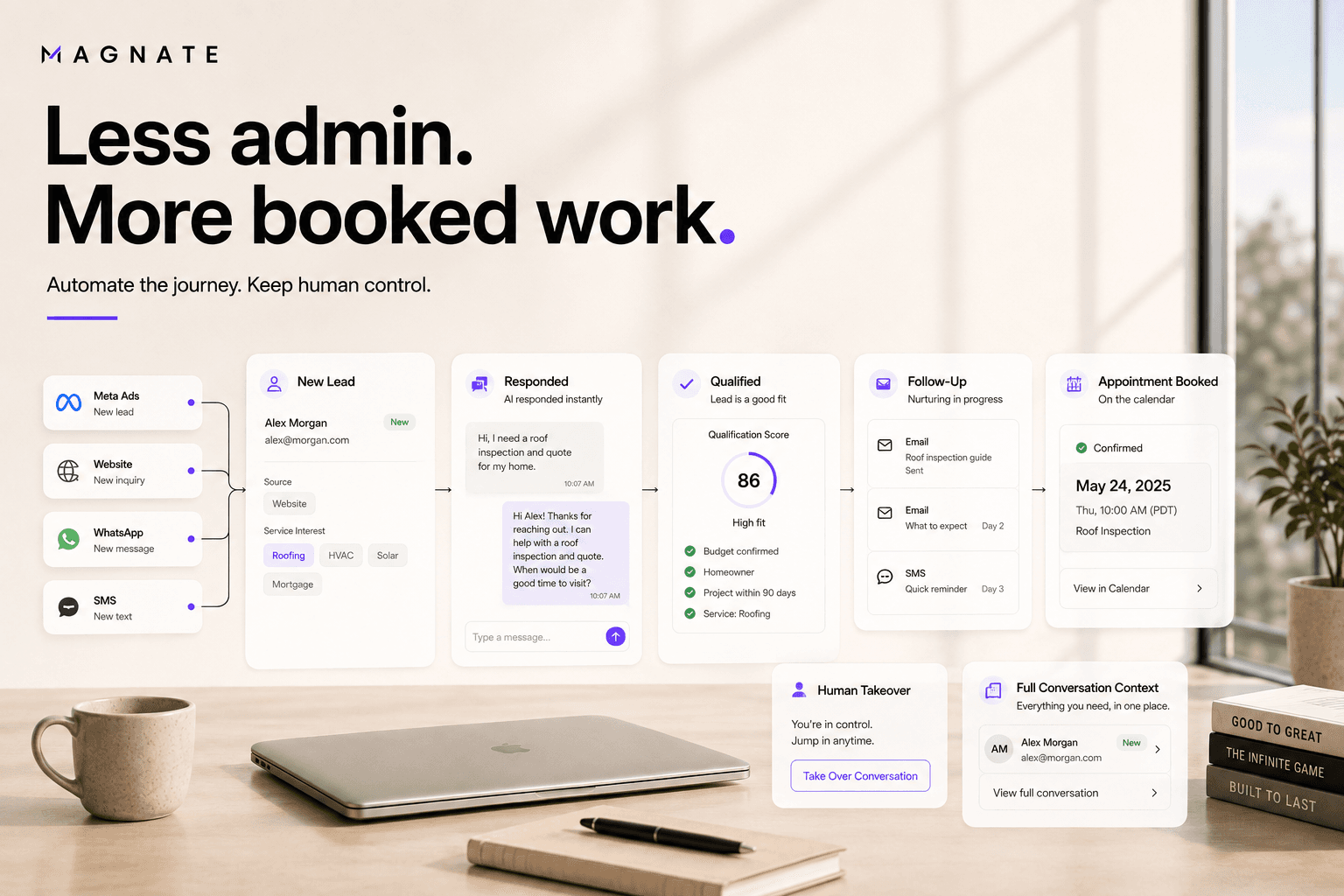
Sales automation for a service business is different from ecommerce automation. The buyer usually does not move from product page to checkout. The sale progresses through questions, qualification, estimates, consultations, inspections, appointments, and human judgment.
That means the best automation does not remove the conversation. It makes the conversation timely, consistent, and easier to continue.
This guide shows how to automate the path from a new inquiry to a qualified next step without turning every customer interaction into a rigid sequence.
What sales automation means for a service business
Sales automation uses software to complete repeatable work and coordinate the information between sales stages.
For a service company, that work can include:
- Receiving a lead from an ad, form, message, referral, or import
- Creating or updating the contact record
- Preserving the source and requested service
- Sending a contextual first response
- Answering approved common questions
- Collecting the details needed to determine fit
- Assigning the lead to a location or specialist
- Scheduling follow-up based on engagement
- Offering the correct appointment type
- Recording the outcome
- Alerting a person when judgment is required
AI sales automation adds language understanding to this workflow. Instead of accepting only exact button choices, the system can interpret an ordinary reply and select the next permitted action.
See how Magnate structures this process on the sales automation software page.
Why service sales processes leak
Most leakage happens between tools and owners, not because a team lacks effort.
A common process looks like this:
- Marketing generates an inquiry.
- A connector creates a CRM record.
- An alert is sent to a channel or inbox.
- A salesperson notices it later.
- The salesperson reconstructs the source and form details.
- The person sends a message or tries a call.
- Future follow-up depends on personal memory.
- Appointment context is copied into another system.
Each handoff adds delay and a place for information to disappear. The integration may be working technically while the prospect still receives no useful next step.
Sales automation should reduce these gaps. It should not add another dashboard that employees must monitor.
Map the lead journey before choosing tools
Begin with the operating process, not a list of software features.
For one high-value lead source, answer these questions:
- What event creates the lead?
- Which source and campaign details matter later?
- What did the person already tell us?
- Which channels may we use?
- What is the first useful customer-facing response?
- Which information determines fit?
- Which questions require a person?
- When can an appointment be offered?
- Who owns the lead at each state?
- What stops follow-up?
- Which final outcomes should be recorded?
Write the answers as states and transitions. A simple model might be new, contacted, engaged, qualifying, qualified, booked, nurture, disqualified, escalated, no response, and opted out.
Every automated action should move the lead toward a valid next state or preserve the current state for a clear reason.
The seven parts of a complete workflow
1. Capture the source and consent context
Store more than contact details. The lead record may need the source, campaign, ad, form, landing page, requested service, submitted answers, timestamp, consent language, channel, and territory.
Use consistent field names across forms. When marketing adds or duplicates a form, test whether the mapping still works. A new field should not silently break qualification or cause the system to ask the same question again.
For a detailed example, use the guide to automating Meta Lead Ads follow-up.
2. Send a meaningful first response
The first response should identify the business, relate to the request, and provide one easy next action.
A receipt message says that the form worked. A meaningful response helps the customer progress. It might ask for the service location, clarify which option they need, or offer the correct appointment type.
Measure time to meaningful response, not only time to internal alert.
3. Answer from approved knowledge
Customers often ask about service areas, process, timing, availability, preparation, pricing structure, or next steps before they agree to a call.
Create a controlled knowledge source for these answers. Assign ownership for updates. Define which claims need a disclaimer and which questions should always reach a qualified person.
An AI agent should acknowledge when it does not have enough approved information. Guessing confidently creates more work and risk than a clear escalation.
4. Qualify progressively
Ask only for information that affects fit, routing, or the next action. Reuse details already provided.
Examples by business type:
| Business | Useful early details | Likely escalation | | --- | --- | --- | | Roofing | Service area, issue type, property type, urgency | Safety concern or complex damage assessment | | Agency | Requested service, goal, current approach, timeline | Custom scope or commercial negotiation | | Real estate | Buying or selling, target area, timeline, property type | Legal, contractual, or financial advice | | Clinic | Appointment type, location, general timing | Medical symptoms or clinical judgment | | Recruitment | Hiring need, role type, location, timeline | Complex workforce or contractual questions |
The objective is not to complete the longest possible questionnaire. It is to collect enough information for the correct next step.
5. Follow up according to behavior
An unanswered first message does not always mean no interest. The person may have submitted the form during work, while traveling, or outside normal business hours.
Build a cadence with a clear purpose for each message. One step may confirm delivery. Another may answer a common concern. A final step may ask whether the conversation should remain open.
The cadence should pause or stop when the person replies, books, is disqualified, opts out, provides invalid contact information, or enters human takeover. Smart follow-up cadences should respond to state, not run blindly on a timer.
6. Book or route the next step
A qualified prospect should not finish qualification and return to waiting.
The workflow can offer the appropriate calendar, assign a territory owner, send the lead to a specialist, or notify a person who must approve the next action.
Store the appointment type, time, owner, qualification summary, and any commitment made during the conversation. This lets the salesperson prepare without asking the customer to repeat the process.
Explore automated scheduling for the booking layer.
7. Keep the conversation visible
Automation is easier to trust when the team can inspect it.
A unified inbox should show the source, messages, automated actions, status changes, scheduled steps, and human replies on one timeline. A person should be able to take over immediately and stop pending automation.
Observability also supports improvement. If many leads ask an unsupported question, update the knowledge. If one source produces low qualification, review the targeting and form. If handoffs wait too long, change ownership and alerts.
Build a minimum viable automation first
Do not begin by automating every service, channel, and exception.
Choose one workflow with enough value to measure. A good first candidate has:
- A consistent trigger
- A repeatable early conversation
- Clear qualification criteria
- A defined owner
- A measurable next step
- Manageable risk
For example, a home services company could start with one Meta Lead Ad campaign for estimates in a specific territory. The initial workflow can capture the form, send a contextual response, ask for ZIP code and job type, offer inspection times to eligible leads, and escalate urgent situations.
Run the workflow with internal test records first. Then release it to a limited share of live leads and review actual conversations before expanding.
Test the awkward paths
Happy-path demonstrations are easy. Production quality appears in exceptions.
Test at least these cases:
- The same person submits two forms.
- A form changes a field name.
- The phone number or email is invalid.
- The first message is not delivered.
- The person answers a different question than the one asked.
- The person changes service interest midway through the conversation.
- The requested service is outside the territory.
- The person asks an unsupported or sensitive question.
- No suitable appointment is available.
- The person asks for a human.
- A salesperson takes over while a follow-up is scheduled.
- The person opts out.
For each case, define the expected state, owner, pending actions, and customer-facing message.
Sales automation mistakes to avoid
Counting a CRM sync as successful follow-up
The record arriving proves only that data moved. Track whether a useful response was delivered and whether the conversation progressed.
Automating a broken process
If teams disagree on qualification, ownership, or stop conditions, software will execute that ambiguity faster. Define the operating model first.
Asking every qualification question at once
Long automated questionnaires create friction. Ask the most valuable missing question and branch from the answer.
Using stale business knowledge
Pricing, service areas, availability, policies, and staff ownership change. Establish a review process and update responsibility.
Contacting every channel simultaneously
More messages do not necessarily create more trust. Coordinate channels according to consent, context, delivery, and engagement.
Hiding the automation from employees
Salespeople need to know what was asked, answered, promised, and scheduled. Human takeover should not start from a blank screen.
Optimizing only for activity
Sent messages and completed tasks are operational counts. The business outcome is qualified progression, booking, attendance, and sales.
Metrics that connect operations to revenue
Use three layers of measurement.
System health
- Lead ingestion success
- Duplicate and mapping errors
- Message delivery rate
- Workflow failures and retries
- Calendar and routing failures
Conversation quality
- Median time to meaningful response
- Reply rate
- Qualification completion
- Unsupported-question rate
- Opt-out rate
- Human escalation and takeover time
Sales progression
- Qualified lead rate by source
- Appointment-booking rate
- Appointment-show rate
- Cost per qualified lead
- Cost per booked appointment
- Opportunity and sale outcomes by campaign and service
Review medians and distributions, not only averages. Segment the results by source, channel, service, territory, and workflow version so one strong segment does not hide another that is failing.
A practical implementation checklist
Before launch, confirm that:
- Every active lead source is connected and tested.
- Source, form answers, timestamp, and consent context are stored.
- Duplicate behavior is defined.
- The first response is relevant to the request.
- Approved knowledge is current and owned.
- Qualification criteria and states have precise definitions.
- Follow-up pauses and stops correctly.
- Sensitive, unknown, urgent, and human-requested conversations escalate.
- Calendar and routing exceptions have a fallback.
- A person can see and take over the full conversation.
- Reporting connects activity to qualified outcomes.
- A limited rollout and review schedule are planned.
Automation should make the human conversation better
The best result is not a sales process with no people. It is a process where people spend their time on qualified, contextual conversations instead of monitoring forms, copying answers, sending repetitive reminders, and coordinating calendars.
Magnate connects lead response, approved answers, qualification, follow-up, routing, booking, and human handoff across supported channels. Your team defines the rules and remains available whenever the conversation needs judgment.
Build sales automation around your customer journey
See how Magnate connects every repeatable step from a new inquiry to a qualified appointment or informed human handoff.
Explore sales automationFrequently asked questions
What should a service business automate first?
Start with one repeatable inbound workflow where response delay or manual follow-up has a visible cost. Define the trigger, first response, qualification questions, stop conditions, booking or routing action, and success metrics.
Does sales automation replace salespeople?
It replaces repetitive coordination and provides coverage. People should continue to own complex discovery, exceptions, sensitive topics, negotiations, relationship decisions, and any work that requires professional judgment.
Can sales automation work across WhatsApp, SMS, email, and web chat?
Yes, if the platform supports those channels and the business has permission to use them. Keep identity, state, ownership, and suppression synchronized so customers do not receive conflicting messages.
What is the difference between workflow automation and AI sales automation?
Workflow automation follows defined triggers and conditions. AI sales automation can also interpret ordinary language and select a permitted next action. Both need explicit controls and observable outcomes.
How should sales automation be measured?
Track system health, conversation quality, and sales progression. Important measures include lead ingestion, delivery, time to meaningful response, qualification completion, booking, show rate, opt-outs, escalation, and sales outcomes by original source.